
PayYourWay
Introducing PayYourWay, a new way to pay loan payments.
PayYourWay 5 Steps

STEP 1
Visit familycu.com.
Click the “Pay Loan” link to get started with text message loan payments.

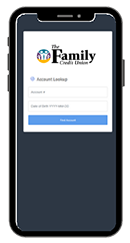
STEP 2
Look up your account.
Enter your account number that is here at the credit union (this number can be found on your online or paper statement, and your birthday, to login to your “PayYourWay” portal.

STEP 3
Add a payment method.
Add any debit card or external bank account from which you’d like to make payments.

STEP 4
Make a payment.
Click “Make Payment Now” and you’re done.

STEP 5
Receive late reminders.
If your loan payment exceeds the due date, you’ll get a friendly reminder of your payment due via text message. Now you can make those payments directly from a text.